Give every task its own branch and its own AI agent — and keep an eye on all of them.
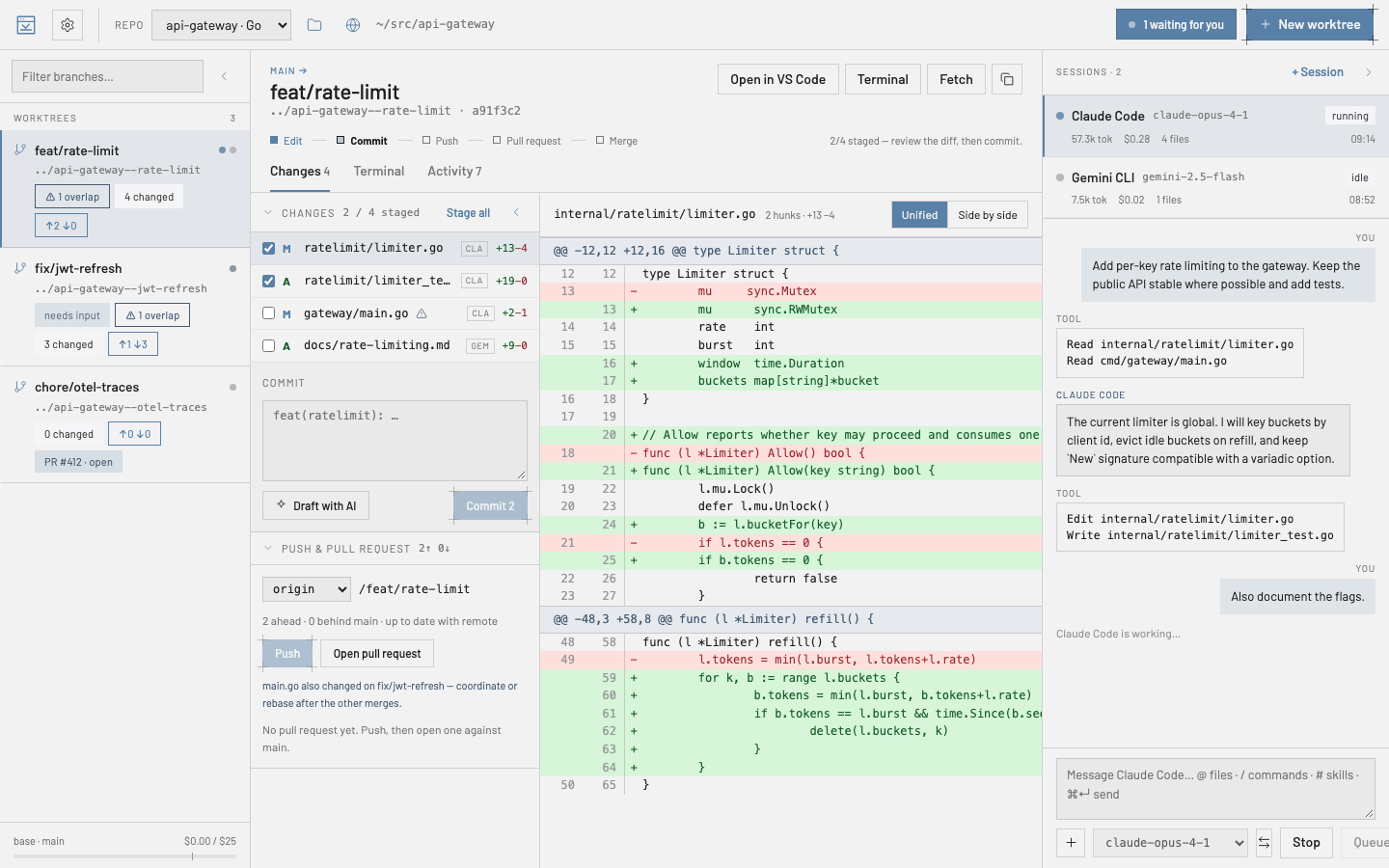
ygd-editor opens each task in its own git worktree, runs a coding agent inside it (Claude Code, Codex, Gemini CLI and five more), and lets you review the changes, commit, push and open the pull request without leaving the window. Free, for macOS, Windows and Linux.
What you get
One worktree per task
Every branch gets its own folder, so agents never step on each other and you can switch tasks without stashing anything.
Agents where the code is
Start Claude Code, Codex, Gemini CLI, Cursor, OpenCode or another agent inside a worktree, watch it work, answer its questions, and hand the session to another agent or worktree when plans change.
Review and ship in place
Stage files, read the diff, ask the agent to explain or change a selection, commit, push and open the pull request from the same screen.
All your agents on one board
Mission control shows every session at a glance, a task board feeds new work to agents as slots free up, and the menu bar — or your phone — tells you when one is waiting on you.
Try it several ways
Run one task with two to four agents or models at once, each in its own worktree, compare what they did side by side, and keep the best.
Undo a turn, not the day
Every agent turn shows what it changed and can be rolled back on its own — your edits and the other turns stay.
Install in a minute
Your computer will warn you the first time. That is expected: nobody paid Apple or Microsoft for a certificate, and the warning is about the missing paperwork, not about anything the app does. Here is how to get past it — once, and never again for that computer.
macOS — Skip the warning: install from Terminal
Paste this into Terminal (Applications › Utilities). It downloads the latest version for your Mac, checks that its checksums carry the project’s signature, that the download matches them and that the app is signed with the project’s certificate, and puts it in Applications. If any check fails, it installs nothing. macOS asks nothing, because nothing came through a browser. Run it again any time to reinstall.
curl -fsSL https://mhguitarte.github.io/ygd-editor/install.sh | bash
macOS
Or, with the disk image from the button above:
- Open the downloaded
.dmg. A window shows these steps in your language — click Continue — then drag ygd-editor into Applications. - Open it. macOS says it could not verify the app and offers Move to Trash or Done: click Done.
- Open System Settings › Privacy & Security, scroll down to Security and click Open Anyway next to ygd-editor. Confirm with your password. That is it — macOS will not ask again.
- On macOS 14 or older, right-click the app › Open does the same in one step.
- Not sure which Mac you have? Apple menu › About This Mac: “Apple M…” is Apple Silicon, anything with “Intel” is Intel.
Windows
- Run the installer. When SmartScreen says “Windows protected your PC”, click More info, then Run anyway.
- The publisher shown is ygd-editor release signing — that is us. Pick the install folder if you like and finish.
- The app appears in the Start menu as ygd-editor.
Linux
- AppImage: make it executable (
chmod +x ygd-editor-*.AppImage) and run it. If it complains about FUSE, run it with--appimage-extract-and-run. - Debian / Ubuntu:
sudo apt install ./ygd-editor-*.deb, then find it in your applications menu.
What you need
Git on your computer and an account with at least one provider. Codex and Gemini CLI are not inside the installer — that is what keeps it small — the app downloads the one you pick the first time you ask for it (about 130–150 MB for Codex, 20 MB for Gemini CLI) and checks it against the version this release was built with before running it; for Claude Code, whose licence does not allow shipping it, Settings › AI providers offers one click that runs Anthropic’s official installer for you, and the same goes for Antigravity, Cursor CLI, OpenCode, Qwen Code and GitHub Copilot CLI with their vendors’ installers. Connecting a provider opens its sign-in page in your browser. For pull requests, GitHub’s gh or GitLab’s glab. The app runs on 64-bit Windows 10 or 11, and on x86-64 Linux with glibc 2.34 or newer (Ubuntu 22.04, Debian 12, Fedora 35 and later).
Updates take care of themselves
Shortly after launch, and every six hours while it stays open, the app checks for a new version and tells you when there is one. One click downloads it, and you choose when it installs: restart now, or the next time you quit. An update installs only when the release’s checksums carry the project’s signature; anything else is refused. Settings › About & updates has a “Check for updates” button and can download new versions by itself. After an update, “What’s new” shows what changed without leaving the app. To try new versions early, switch the update channel to Beta.
New here?
The user guide walks through the first ten minutes: opening a repository, creating a worktree, starting an agent, reviewing and shipping the result.
Is my download genuine?
Two independent checks, neither of which relies on trusting a name. You do not need to run them; they are here for the people who want to.
Is my download genuine? — the technical details
Signed checksums. Every version since 0.17.2 comes with SHA256SUMS.txt and its signature, SHA256SUMS.txt.sig, made with the project’s key — the one behind its certificate, release-signing.pem. Put both next to your download and check the certificate’s fingerprint against this one first: that is the step that proves the rest, because whoever could replace an installer could replace a certificate next to it. The signature then vouches for the checksums, and the checksums for every file. Only openssl is needed (macOS and Linux have it; on Windows, use Git Bash). Expect Verified OK, then OK for your file:
curl -fsSLO https://mhguitarte.github.io/ygd-editor/release-signing.pem
openssl x509 -in release-signing.pem -noout -fingerprint -sha256   # 46:C5:62:…:74:C3:AB
openssl x509 -in release-signing.pem -pubkey -noout > release-signing.pub
openssl dgst -sha256 -verify release-signing.pub -signature SHA256SUMS.txt.sig SHA256SUMS.txt   # Verified OK
sha256sum --check --ignore-missing SHA256SUMS.txt   # macOS: shasum -a 256 -c --ignore-missing SHA256SUMS.txt
Older versions. 0.6.0 to 0.17.1 come with an unsigned SHA256SUMS.txt, and the code signature below is what vouches for them. 0.1.0 to 0.4.0 were built by the project’s release workflow on GitHub and carry its Sigstore signature instead, SHA256SUMS.txt.sigstore.json. With cosign installed:
cosign verify-blob --bundle SHA256SUMS.txt.sigstore.json \
  --certificate-identity-regexp '^https://github.com/MHGuitarte/ygd-editor(-app)?/\.github/workflows/release\.yml@refs/tags/v' \
  --certificate-oidc-issuer https://token.actions.githubusercontent.com SHA256SUMS.txt
sha256sum --check --ignore-missing SHA256SUMS.txt   # macOS: shasum -a 256 -c --ignore-missing SHA256SUMS.txt
Code signature. The macOS app and the Windows installer are signed with the project’s certificate (public key). Compare the fingerprint, not the name — anyone can name a certificate anything.
SHA-1 (macOS codesign · Windows thumbprint) 79A40643BDFE500AB6730154B03B336C1809C57C# macOS codesign --verify --deep --strict /Applications/ygd-editor.app && codesign -dvv /Applications/ygd-editor.app 2>&1 | grep Authority # Windows (PowerShell) (Get-AuthenticodeSignature .\ygd-editor-*-setup.exe).SignerCertificate.Thumbprint