Give every task its own branch and its own AI agent — and keep an eye on all of them.
ygd-editor opens each task in its own git worktree, runs a coding agent inside it (Claude Code, Codex or Gemini CLI), and lets you review the changes, commit, push and open the pull request without leaving the window. Free, for macOS, Windows and Linux.
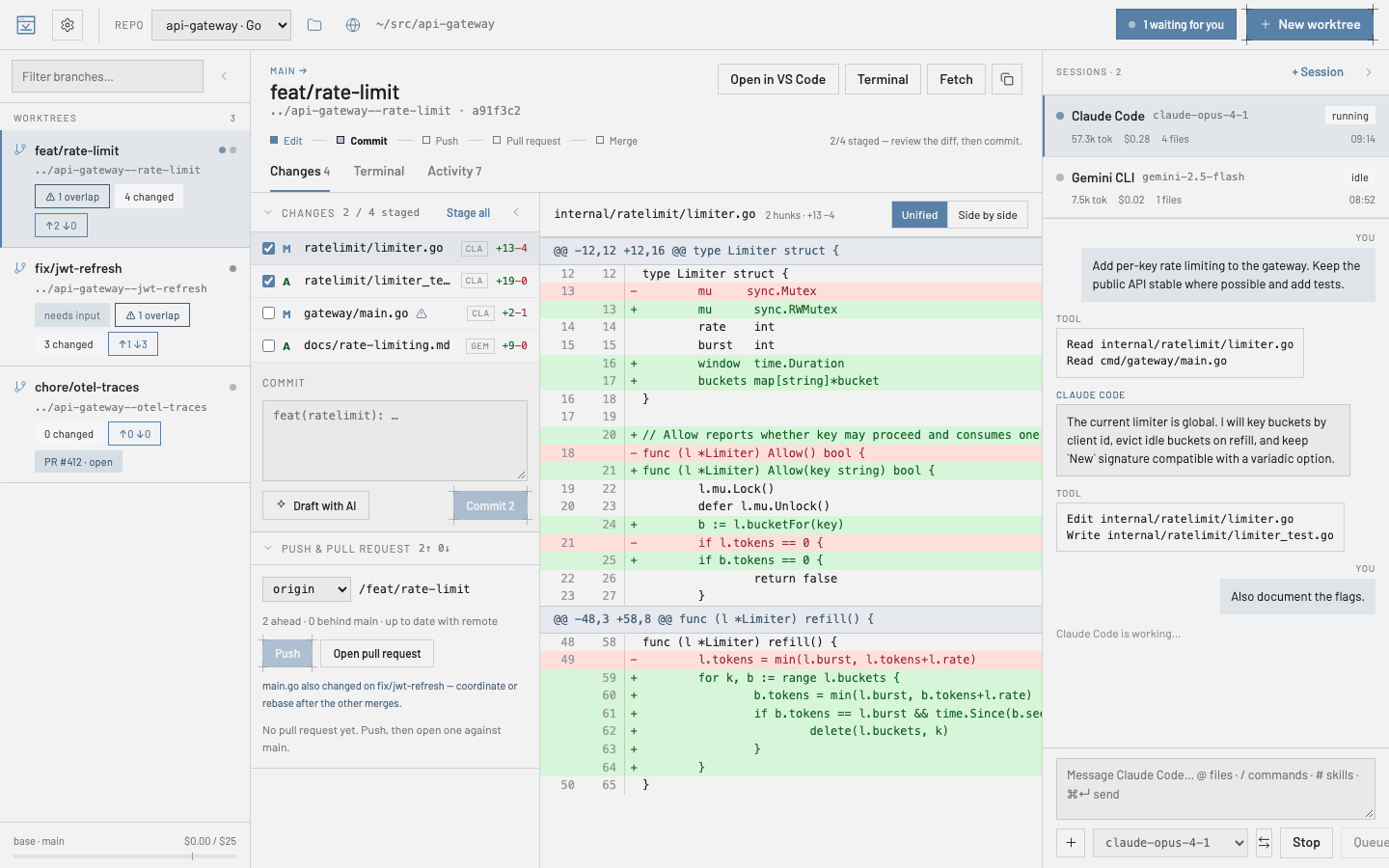
What you get
One worktree per task
Every branch gets its own folder, so agents never step on each other and you can switch tasks without stashing anything.
Agents where the code is
Start Claude Code, Codex or Gemini CLI inside a worktree, watch it work, answer its questions, and hand a session to another worktree when plans change.
Review and ship in place
Stage files, read the diff, ask the agent to explain or change a selection, commit, push and open the pull request from the same screen.
Stays out of your way
A single inbox for every session waiting on you, optional desktop notifications, and a daily spend meter with limits you set.
Install in a minute
Your computer will warn you the first time. That is expected: nobody paid Apple or Microsoft for a certificate, and the warning is about the missing paperwork, not about anything the app does. Here is how to get past it — once, and never again for that computer.
macOS
- Open the downloaded
.dmg. A window shows these steps in your language — click Continue — then drag ygd-editor into Applications. - Open it. macOS says it could not verify the app and offers Move to Trash or Done: click Done.
- Open System Settings › Privacy & Security, scroll down to Security and click Open Anyway next to ygd-editor. Confirm with your password. That is it — macOS will not ask again.
- On macOS 14 or older, right-click the app › Open does the same in one step.
- Not sure which Mac you have? Apple menu › About This Mac: “Apple M…” is Apple Silicon, anything with “Intel” is Intel.
Windows
- Run the installer. When SmartScreen says “Windows protected your PC”, click More info, then Run anyway.
- The publisher shown is ygd-editor release signing — that is us. Pick the install folder if you like and finish.
- The app appears in the Start menu as ygd-editor.
Linux
- AppImage: make it executable (
chmod +x ygd-editor-*.AppImage) and run it. If it complains about FUSE, run it with--appimage-extract-and-run. - Debian / Ubuntu:
sudo apt install ./ygd-editor-*.deb, then find it in your applications menu.
What you need
Git on your computer and an account with at least one provider. Codex and Gemini CLI come inside the app, nothing to install; for Claude Code, whose licence does not allow shipping it, Settings › AI providers offers one click that runs Anthropic’s official installer for you. Connecting a provider opens its sign-in page in your browser. For pull requests, GitHub’s gh or GitLab’s glab.
Updates take care of themselves
Shortly after launch the app checks for a new version, downloads it quietly and offers “Restart to update”. Settings › Notifications also has a “Check for updates” button and, if you prefer, an option to install updates by itself when nothing is running. After an update, the app tells you what version you are on and links to what changed.
New here?
The user guide walks through the first ten minutes: opening a repository, creating a worktree, starting an agent, reviewing and shipping the result.
Is my download genuine?
Two independent checks, neither of which relies on trusting a name. You do not need to run them; they are here for the people who want to.
Is my download genuine? — the technical details
Provenance. Every version comes with SHA256SUMS.txt, signed through Sigstore by the project’s own release workflow. With cosign installed:
cosign verify-blob --bundle SHA256SUMS.txt.sigstore.json \
  --certificate-identity-regexp '^https://github.com/MHGuitarte/ygd-editor/\.github/workflows/release\.yml@refs/tags/v' \
  --certificate-oidc-issuer https://token.actions.githubusercontent.com SHA256SUMS.txt
sha256sum --check --ignore-missing SHA256SUMS.txt   # macOS: shasum -a 256 -c SHA256SUMS.txt
Code signature. The macOS app and the Windows installer are signed with the project’s certificate (public key). Compare the fingerprint, not the name — anyone can name a certificate anything.
SHA-256 46:C5:62:27:2A:5C:22:9E:D7:85:E1:A3:0D:47:2A:A3:5B:CE:AC:F0:7D:E4:D8:A3:49:23:C9:7B:D3:74:C3:AB SHA-1 (macOS codesign · Windows thumbprint) 79A40643BDFE500AB6730154B03B336C1809C57C# macOS codesign --verify --deep --strict /Applications/ygd-editor.app && codesign -dvv /Applications/ygd-editor.app 2>&1 | grep Authority # Windows (PowerShell) (Get-AuthenticodeSignature .\ygd-editor-*-setup.exe).SignerCertificate.Thumbprint